Document integrity
OpenAttestation ensures that the content of the document has not been modified since the document was created, with the exception of data removed using the built-in obfuscation mechanism.
The Ethereum tutorial shows you how to wrap a document and issue it into a document store.
The following sections explain the purpose of wrapping and issuing a document and why these actions are necessary.
Wrapping a document
Wrapping a document works on a JSON object. A single wrapped document will look like this:
{
  "version": "https://schema.openattestation.com/2.0/schema.json",
  "data": {
    "name": "2f1a9924-bc38-455c-b39e-6420001ad67b:string:Maersk Bill of Lading",
    "issuers": [
      {
        "identityProof": {
          "type": "40caddff-5cd4-477d-adf4-48dcd0a2d761:string:DNS-TXT",
          "location": "c15358f4-f0dc-41c8-abfb-0d030aae3233:string:imaginative-amber-ferret.sandbox.openattestation.com"
        },
        "name": "0de92429-f8d3-47a0-868f-154227a66f40:string:DEMO STORE",
        "tokenRegistry": "89c1f33c-121d-4622-a561-12fb400f2f3f:string:0x8194648f40ED07F841fA357Bf52CBE8D6d7ce48D"
      }
    ]
  },
  "signature": {
    "type": "SHA3MerkleProof",
    "targetHash": "11d456db211d68cc8a6eac5e293422dec669b54812e4975497d7099467335987",
    "proof": [],
    "merkleRoot": "11d456db211d68cc8a6eac5e293422dec669b54812e4975497d7099467335987"
  }
}
These transformations happened:
- A
datakey has been created and its value holds the file content previously provided when wrapping, along with some extra (hexadecimal) data. - A
signatureobject has been created.
The data object
The first step of wrapping uses the following algorithm to transform all the object properties provided as the input:
- For each property, generate a salt using uuid v4 to prevent rainbow table attack.
- Determine the type of the original property.
- Transform the original value to
<salt>:<original-type>:<original-value>.
Note: The shape of the input object remains untouched.
The signature object
targetHash
Once computing the data object, you can create a unique hash for the document to set into targetHash:
-
List each property's path from the
dataobject and associate its value.The path follows the flatley path convention. For instance:
name,issuers.0.tokenRegistry, etc. -
For each property's path, compute a hash using the properties' path and value.
To compute the hash you use keccak256.
-
Sort all the hashes from the previous step alphabetically and hash them all together.
This will provide the
targetHashof the document.To compute the
targetHash, you can also use keccak256.
Note: The
targetHashof a document is a unique identifier.
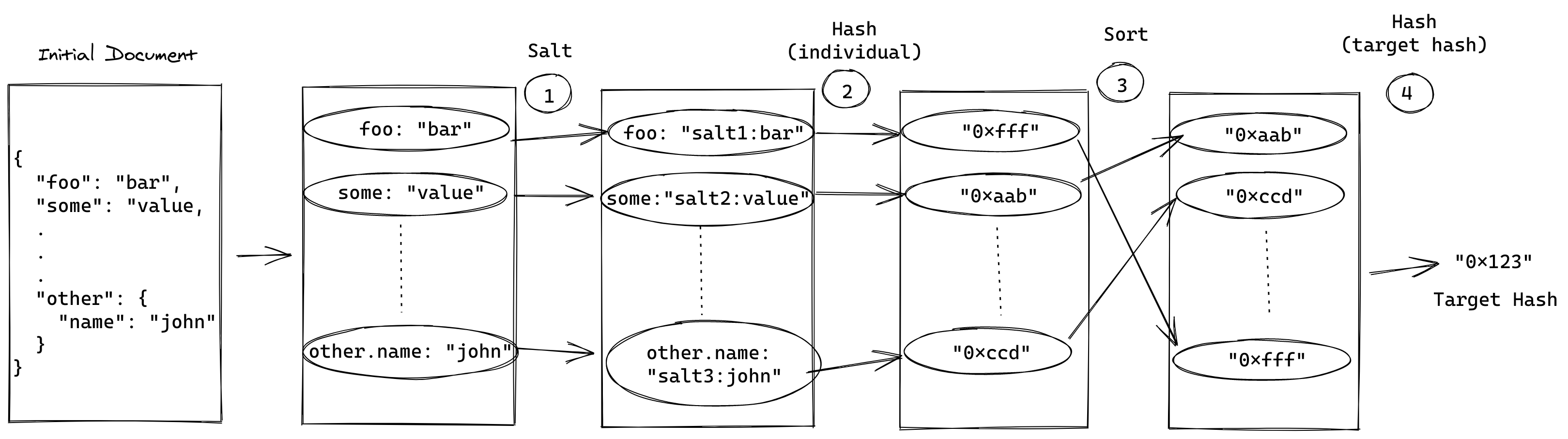
In a later procedure of verifying the document, you will perform exactly the same steps again to assert that the document content has not been tampered with. This works because the final targetHash will be completely different, if any part of the wrapped document is different from the original.
Data obfuscation
Due to the way you compute targetHash, you can use OpenAttestation to obfuscate data not intended for public access. To achieve this, the hash of a specific field is computed and added into the document. You can try it with the CLI and the document above:
open-attestation filter ./path/to/file.json ./output.json name
The content of output.json will look like the following:
{
  "version": "https://schema.openattestation.com/2.0/schema.json",
  "data": {
    "issuers": [
      {
        "identityProof": {
          "type": "40caddff-5cd4-477d-adf4-48dcd0a2d761:string:DNS-TXT",
          "location": "c15358f4-f0dc-41c8-abfb-0d030aae3233:string:imaginative-amber-ferret.sandbox.openattestation.com"
        },
        "name": "0de92429-f8d3-47a0-868f-154227a66f40:string:DEMO STORE",
        "tokenRegistry": "89c1f33c-121d-4622-a561-12fb400f2f3f:string:0x8194648f40ED07F841fA357Bf52CBE8D6d7ce48D"
      }
    ]
  },
  "signature": {
    "type": "SHA3MerkleProof",
    "targetHash": "11d456db211d68cc8a6eac5e293422dec669b54812e4975497d7099467335987",
    "proof": [],
    "merkleRoot": "11d456db211d68cc8a6eac5e293422dec669b54812e4975497d7099467335987"
  },
  "privacy": {
    "obfuscatedData": ["9d22655fcee6bf3eb10ba280cfa40e662f004a819be0b64e2fe9d0cebba6788f"]
  }
}
The name field is not available anymore in the data object, and the hash associated to it is in privacy.obfuscatedData.
Note: The document remains valid.
The hash added into privacy.obfuscatedData is the one used by the framework when computing the targetHash. To verify that a document is not tampered with, OpenAttestation computes the targetHash of the provided document and compare it to signature.targetHash. There is one subtle difference during verification. All the hashes available in privacy.obfuscatedData are added to the list of computed hashes. Therefore, the following shows the steps for verification:
- List each property's path from the
dataobject and associate its value. - For each property's path, compute a hash using the property's path and value.
- Append the hashes from
privacy.obfuscatedDatato the list of computed hashes from the previous step. - Sort all the hashes from the previous step alphabetically and hash them all together: this will provide the
targetHashof the document.
The only difference with the targetHash computation is in Step 3.
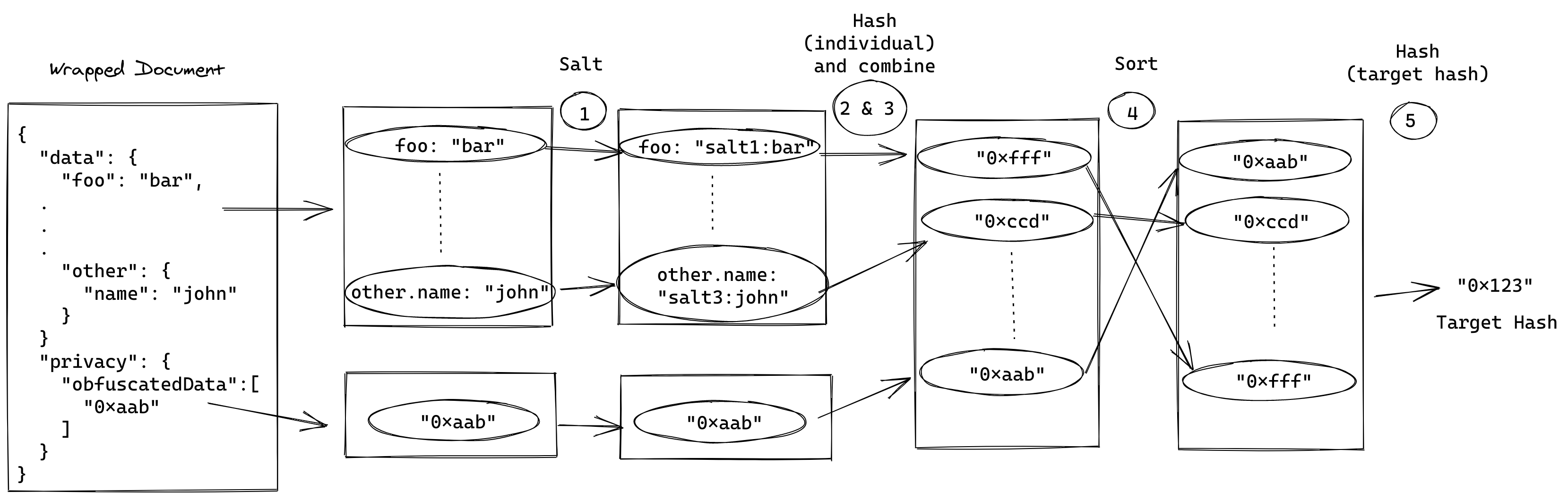
Using data obfuscation, the user will have the option to share only a subset of the data.
Additional information
Data obfuscation limitations
Empty objects
Considering the following object in data:
{
  "data": {
    "foo": {
      "bar": 1,
      "xyz": 2
    }
  }
}
The following obfuscation will work:
foo.baronlyfoo.xyzonlyfoo(that will remove the object completely)
However, obfuscating both foo.bar AND foo.xyz would lead to an error. Actually, obfuscation does not work when you apply it to all individual fields of an object, leaving the object empty:
{
  "data": {
    "foo": {}
  }
}
While OpenAttestation can provide a way to make this work (and actually it used to), that will also introduce a new behavior: anyone could add empty objects into the document, and the document would remain valid. Due to the considerations of potential vulnerabilities, OpenAttestation decided not to support it.
To avoid this problem, obfuscate the full object (foo in this case) when you need to obfuscate all the fields of an object.
targetHash and merkleRoot
To learn more about the differences between targetHash and merkleRoot, see here.